Guide
How to stop losing track of work while you wait
Waiting is part of the job. What hurts is what you forget while you wait.
October 14, 2026 · Stephanie, maker of Weavr
Here's a day I've had more times than I can count. The app is building, so I open something else to work on. A pull request is in review and I can't go any further until it's merged, so I pick up another task. That task turns out to be interesting. Two hours later I'm deep in it, and the pull request has been approved since lunch, sitting there waiting for someone to press merge. That someone was me, and I'd forgotten it completely.
None of the work was hard. Filling the wait with other work was the right call. The problem was that coming back depended on me remembering to.
Why the switch back never happens
Switching away from something is easy because there's a clear moment for it: you hit a wait. Switching back has no such moment.
- The thing you're waiting on doesn't tap you on the shoulder. A build finishes quietly. An approval lands in an inbox you're not looking at. A reply arrives while you're focused on something else.
- The new task takes all of your attention. That's what good focus feels like, and it's exactly what pushes the old task out of your head.
- Your to-do list doesn't help in the moment. "Merge the PR" is on it, somewhere among forty other items. The list knows the task exists. It doesn't tell you it's time to go back.
What actually helps
- Write down the step you're on before you switch. One line is enough: "waiting on review, then merge and deploy". When you come back, you start right where you stopped instead of rebuilding the context from scratch.
- Keep a short rotation of what's in progress. Separate the handful of things you're actively moving forward from the long list of things you'll do someday. Five ongoing pieces of work are easy to cycle through. Forty are not.
- Come back on a rhythm, not on memory. Each time you finish a stretch of work, move to the next item in the rotation instead of choosing what feels most urgent. Everything gets a turn, including the thing that went quiet.
- Let the important work come around more often. Not everything deserves the same share of your day. The project with a deadline can come up every second or third turn, while the slow side project waits its turn.
- Keep small tasks out of the rotation. "Reply to Sam" isn't ongoing work. Let quick tasks slot in between the bigger things so they get done without taking over.
- Empty your head once a day. A running page for everything on your mind means the stray thoughts stop competing with the work in front of you.
How Weavr does this for you
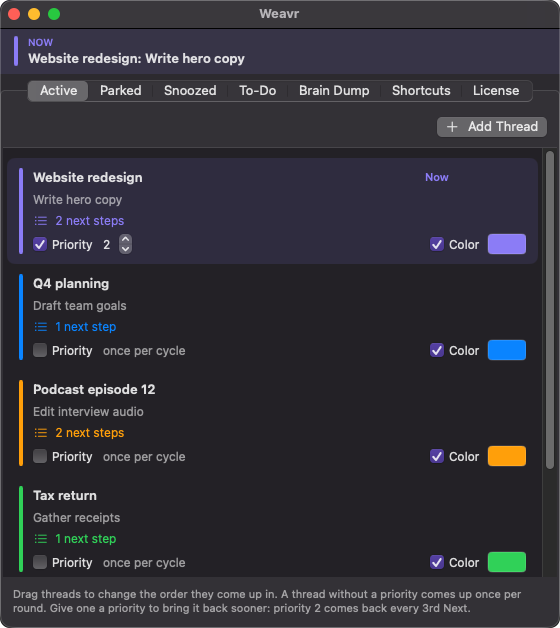
I built Weavr because I wanted this system without having to run it in my head. It lives in your Mac's menu bar and does the remembering.
Each piece of ongoing work is a thread, and each thread remembers the step you're on and the steps after it. The menu bar always shows where you are, like Checkout redesign: Merge the PR. When you hit a wait, press Next (or ⌃⌥⌘N from any app) and you're on the next thread, right where you left it. Keep pressing Next and you come back around, so the pull request gets its turn whether or not you remembered it.
A priority brings a thread back more often. Small to-dos drop in between threads, and scheduled ones show up right on time. A brain dump carries over from one day to the next.