Guide
A menu bar to-do app for Mac
The best place for what you're working on is somewhere you see all day without looking for it.
October 14, 2026
Most to-do apps live in a window. You open the window, read the list, pick something, and close it again. Then the list is out of sight, and so is whatever you meant to come back to.
The menu bar is different. It sits at the top of the screen over every app you use, and you glance at it dozens of times a day without thinking about it. Put the thing you're working on there and you always know where you are, with no window to open.
What Weavr shows in your menu bar
Weavr is built for ongoing work: the projects, tasks and errands you move forward a step at a time across days. Each one is a thread, and the menu bar shows the thread you're on and the step you're at:
Website redesign: Write the hero copy
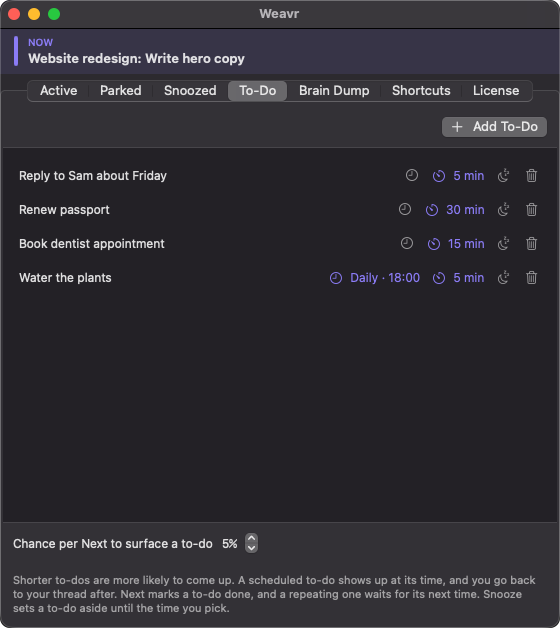
The little weave icon next to it takes the thread's color, so you can tell what you're on at a glance. When a quick to-do comes up instead, the menu bar shows it with a checkbox: ☐ Reply to Sam about Friday.
One shortcut to move on
When you finish a stretch of work or hit a wait, press Next. Weavr moves you to the next thread and shows its step. You don't decide what's next or look through a list. You keep cycling, and every thread gets its turn.
Next works from the menu or from anywhere on your Mac with a global shortcut:
- ⌃⌥⌘N: next thread
- ⌃⌥⌘M: next, and move this thread on to its planned next step
- ⌃⌥⌘I: next, after typing this thread's new step
- ⌃⌥⌘S: snooze what's current
You can change any of them to the keys you like.
Everything else Weavr does
- Priorities. A thread with a priority comes back more often, on a steady rhythm rather than at random.
- To-dos in between. Small tasks drop in between threads every so often. Give one a time estimate and the shorter ones come up more often.
- Scheduled to-dos. Set a to-do for a time, once or on a repeat, and it interrupts right on time, then hands you back to what you were doing.
- Park and snooze. Park a thread you're not working on and bring it back when you're ready, or snooze one until a time you choose and it comes back on its own.
- A brain dump. One running page for everything on your mind, carried over day to day. Link it to a Markdown file and edit it in Obsidian too.
- Start and end your day. Start Day opens your brain dump and puts you on your first thread. End Day makes Weavr go quiet until tomorrow.
Private, and yours to keep
Weavr has no account and no cloud. Your threads, to-dos and brain dump stay on your Mac, and it works offline. It runs on macOS 13 or later, on Apple Silicon and Intel. It's $12 once, for up to two Macs, after a 14-day free trial with every feature.